页面: 1
#1 2014-04-04 14:44:00
- caizhengzhu
- 管理员
如何通过TFTP升级Fortigate OS
1.到ftp://pftpintl:F0rt1intl@support.fortinet.com/ 下载适合的固件
2.用终端线将Fortigate连接到电脑com口,用网线将电脑网卡连接防火墙port1口
3.架设TFTP服务器: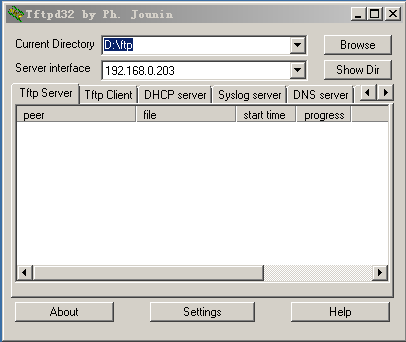
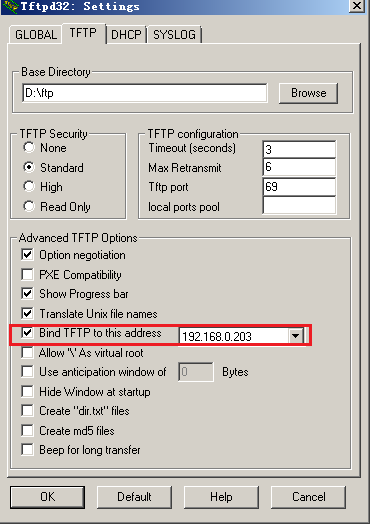
4.超级终端和TFTP绿色软件(没验证安全性)在网盘中有,名称是fortigate的压缩文件:
5.超级终端中设置Baud Rate(BPS)9600,Data bits 8 , Partiy None , Stop bits 1 and flow control None
6.
[G]: Get firmware image from TFTP server.
[F]: Format boot device.
[Q]: Quit menu and continue to boot with default firmware.
[H]: Display this list of options.
Enter G,F,Q,or H: ( 选择'F')
Formatting boot device...
...............
Format boot device completed.
Enter G,F,Q,or H: ( 选择'G')
Enter TFTP server address [192.168.1.168]: 192.168.171.129 (输入TFTP服务器的IP地址)
Enter local address [192.168.1.188]: 192.168.171.171 (任意的和TFTP服务器同网段的IP地址)
Enter firmware image file name [image.out]: FGT_60-v280-build219-FORTINET.out
MAC:00:09:0f:0a:1a:7c
##########
Total 10643362 bytes data downloaded.
Verifying the integrity of the firmware image.
Total 28000kB unzipped.
Save as Default firmware/Run image without saving:[D/R]? (选择 'D' )
Programming the boot device now.
The system must format the boot device to install this firmware.
The default and backup firmware will be deleted.
Continue (Y/N)?: ( 选择'Y' )
....................
Reading boot image 1368285 bytes.
Initializing firewall...
System is started.
离线
#2 2014-04-04 14:44:55
- caizhengzhu
- 管理员
回复: 如何通过TFTP升级Fortigate OS
参考:http://support.fortinet.com.cn/index.php?m=content&c=index&a=show&catid=18&id=85
http://www.docin.com/p-229342517.html
http://blog.csdn.net/gotonet/article/details/1355770
离线
页面: 1
- 在此主题中在线的注册用户:0, 访客:1
- [Bot] ClaudeBot